
dbForge Source Control for SQL Server
Link databases to Version Control Systems.
Published by Devart
Distributed by ComponentSource since 2005
Prices from: $ 391.95 Version: 2026.1.77 NEW Updated: Jun 25, 2026
Link databases to Version Control Systems.
Published by Devart
Distributed by ComponentSource since 2005
Prices from: $ 391.95 Version: 2026.1.77 NEW Updated: Jun 25, 2026
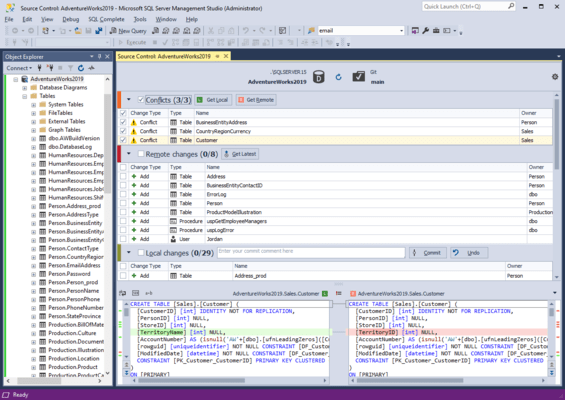
dbForge Source Control for SQL Server is part of dbForge SQL Tools.
Link databases to Version Control Systems.
dbForge Source Control is an SSMS add-in that brings version control capabilities directly into the familiar environment. It fills the gap created by the absence of native version control features in SSMS, allowing teams to work more effectively within their preferred IDE.
dbForge Source Control for SQL Server Feature Highlights:
Supported version control systems
dbForge Source Control supports all the major version control systems, including Azure DevOps Server (previously known as Team Foundation Server a.k.a. TFS), Apache Subversion (SVN), TFVC, Git (including GitHub, GitLab, and Bitbucket), Mercurial (Hg), Perforce (P4), SourceGear Vault.
Git solutions supported by Source Control
Everything your software team needs in a single tool
Version control
Management of database changes in SSMS becomes significantly more efficient with integrated source control. It helps developers track all modifications to database objects and prevent unintended changes. With this feature in SSMS, teams can work more reliably, with better consistency and accountability. Key advantages:
Collaboration
Once version control becomes available in SSMS, collaboration in database development becomes significantly more efficient. Multiple developers can work on the same database without conflicts through branching, merging, and object locking. This option minimizes the risk of overwriting and improves coordination across teams. Key advantages:
Rollback and recovery
Source control in SSMS is incomplete without a mechanism for rollback and recovery, allowing users to track and revert changes to previous stable versions of database objects. This option minimizes the risk of data loss and errors, ensuring stable, reliable environments for teams. Key advantages:
Compliance and auditing
The feature of source control in SSMS helps teams ensure compliance and meet the required auditing standards. It maintains a detailed, chronological history of all database changes, capturing who made each change, as well as when and why. Key advantages:
Benefits of SQL source control for development and business operations
Tel: (888) 850 9911
Fax: +1 770 250 6199


