KeepTool 12 released
Released: Mar 1, 2016
Updates in this release
Updates in 12
- Windows 10 Compatibility - All client editions now run on Microsoft Windows 7, 8.1 and 10 and the corresponding server versions: 2008 release 2, 2012, 2012 release 2 and 2016.
- Additional Oracle 12c Features - KeepTool 12 now supports the EXPLICIT NULLS clause, invisible columns and Oracle identity columns.
- A Visual Facelift - KeepTool 12 introduces a new look and feel. All button images have been repainted to blend seamlessly into Google’s new Material Design. The skinned user interface is now enabled by default, showing fewer edges and lines than before.
- Oracle Spatial - Oracle Spatial support has been improved. The following new features have been added to the “Schema | Spatial Columns” page:
- Maintenance of Spatial Indexes
- Coordinate system changes including data transformation
- Configuration of the bounding rectangle
- Automatic creation of comments for MDRT tables implicitly created by Oracle
- Create Table Dialog - In the “Create Table” dialog, the “Add stamps” tab lets you add several pre-defined columns to the table, e.g. timestamps for record creation or last change. KeepTool 12 now lets you freely customize these columns and save the new column set as the default for future use.
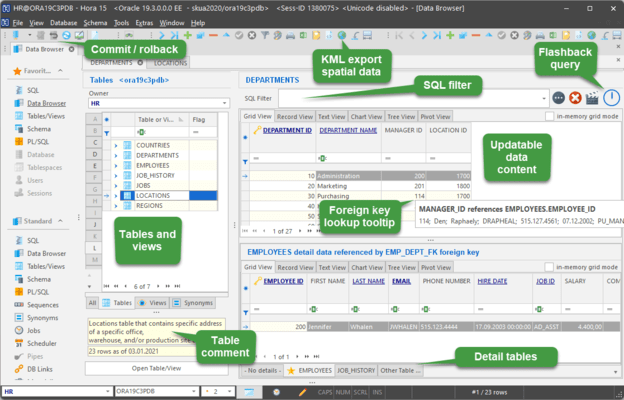
- Data Contents - The Data Content view now permits flashback querying. The button resembling a clock opens a dialog box where you can enter a flashback expression, for example to see historic data as of the beginning of the current day.
- PL/SQL Page - The list of procedures within a package has been moved to the left side of the editor window.
- SQL Editor Window - KeepTool 12 adds a list of check boxes that can be used to specify column names to be included in the query.
- Sessions Page - Now, for inactive sessions, KeepTool displays the SQL statement being executed at the time the session became inactive.