
Beyond Compare
Compare files and folders on your Windows, Linux or macOS system.
Published by Scooter Software
Distributed by ComponentSource since 2013
Prices from: US$ 34.30 Version: 5.2.x NEW Updated: May 20, 2026 
 (22)
(22)
Compare files and folders on your Windows, Linux or macOS system.
Published by Scooter Software
Distributed by ComponentSource since 2013
Prices from: US$ 34.30 Version: 5.2.x NEW Updated: May 20, 2026 (22)
| Standard Edition | Pro Edition | |
| General Features | ||
| Responsive, multithreaded interface | ||
| Tabbed interface | ||
| Integrated shell extension | ||
| Save comparisons as sessions to easily load them later | ||
| Automatically save sessions when closing them | ||
| Save workspaces containing all open windows and sessions | ||
| Home view with easy access to viewers and saved sessions | ||
| View Unix patch files as a side-by-side comparison | ||
| Standalone text editor | ||
| Script processor for automating tasks | ||
| Command line interface | ||
| Supports high DPI (retina) displays | ||
| Automatic check for updates | ||
| Drag & drop to start comparisons | ||
| Customizable fonts, colors, and keyboard shortcuts | ||
| Extensive context-sensitive help | ||
| Dedicated support staff available via email, phone, and forums | ||
| Dark Mode | ||
| Apple CPU (M1/M2) Native | ||
| Windows 11 Context Menu | ||
| Compare Files | ||
| Side-by-side display | ||
| Color highlighting of differences within lines | ||
| Display filters to show only differences | ||
| Jump to next/previous difference within file or folder | ||
| Printed and HTML comparison reports | ||
| Unicode and MBCS support | ||
| Thumbnail overview of comparison | ||
| Can convert files before comparing them | ||
| Compare files or clipboard contents | ||
| Automatic backups when saving | ||
| Text Compare | ||
| Inline editing with dynamic recomparison | ||
| Syntax highlighting | ||
| Ignore unimportant differences: | ||
| Comments | ||
| Whitespace | ||
| Delimited strings | ||
| Regular expressions | ||
| Character case | ||
| Page headers | ||
| Columns | ||
| Line terminator style | ||
| Manually Ignore selection | ||
| Ignore replaced text and renamed identifiers | ||
| Flexible alignment: | ||
| Aligns similar lines | ||
| Multiple alignment styles | ||
| Optionally suppress alignment of differences | ||
| Manually align changes or break alignments | ||
| Two- and three-way merge with output panel: | ||
| Merges changes automatically | ||
| Marks conflicting sections | ||
| Take whole difference sections or selections | ||
| Find & replace | ||
| Microsoft Word, Adobe PDF, and Rich Text converted to text automatically | ||
| Adaptive gutter buttons for copying sections | ||
| Formatted HTML view | ||
| View Delphi binary form files as text | ||
| Line details as text, hex, or with character alignment | ||
| Compare files with different formats | ||
| Bookmarks | ||
| Word Wrap | ||
| Table Compare | ||
| Grid view | ||
| Compare CSV, tab delimited, HTML tables, and Excel worksheets | ||
| Ignore differences within numeric or date tolerances | ||
| Ignore or hide unimportant columns | ||
| Align based on key columns or all columns | ||
| Rearrange columns to compare files in different orders | ||
| Sort data before comparing | ||
| Compare multiple Excel sheets and multiple HTML tables | ||
| Binary Compare | ||
| Display binary files as hex | ||
| Inline editing with dynamic recomparison | ||
| Fast byte-by-byte alignment | ||
| Limit display to differences | ||
| Wrap lines to display | ||
| Find & Replace | ||
| Registry Compare | ||
| Local and remote registry hives | ||
| Registry exports (.reg) | ||
| Inline editing | ||
| Recursively expand keys in-place | ||
| Picture Compare | ||
| Many picture formats | ||
| Flip, rotate, and scale images | ||
| Multiple comparison types | ||
| Thumbnail of pixels around the mouse cursor | ||
| Ignore differences within an RGB tolerance | ||
| Ignore replaced colors | ||
| Zoom to show entire image automatically | ||
| Other Comparisons | ||
| Compare .exe version information | ||
| Compare MP3 tags | ||
| Compare FLAC, MP4, ACC and OGG tags | ||
| Can use third-party comparison utilities for unsupported files | ||
| Compare Folders | ||
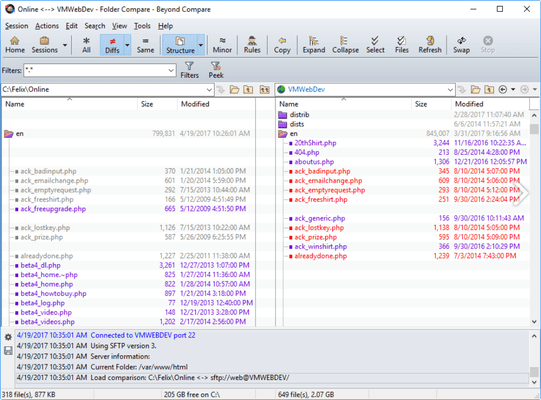
| Compare folders side-by-side | ||
| Color highlighting of differences | ||
| Automatically compare subfolders and expand them in place | ||
| Display filters to show added, modified, or matching files and folders | ||
| Flexible comparison criteria: | ||
| Last modified time | ||
| Size | ||
| Filename case | ||
| DOS attributes | ||
| File content (CRC32, byte-byte-byte, file format specific, or exe/dll versions) | ||
| Ignore selection | ||
| Exclusion filters: | ||
| File and folder names | ||
| Sizes | ||
| Last modified times | ||
| File content | ||
| DOS and Unix attributes | ||
| Dedicated synchronization commands | ||
| Powerful file operations: | ||
| Copy, Move, Delete, Rename, Change Attributes, Set Last Modified Time | ||
| Multiple operations can run in the background | ||
| Pause running operations | ||
| Two- and three-way folder merge: | ||
| Merge to a separate output location or overwrite one of the inputs | ||
| Automatically merge text files | ||
| Ignore folder structure | ||
| Printed and HTML comparison reports: | ||
| Link an HTML folder comparison report to individual file comparison reports | ||
| Optionally follow symbolic links and NTFS junction points | ||
| Align filenames with different extensions | ||
| Align filenames using wildcard masks (e.g., "Apples*" => "Bananas*") | ||
| Align filenames with different Unicode normalization forms (OS X vs Windows) | ||
| Copy NTFS ACLs and DOS short (8.3) filename aliases | ||
| Virtual File System | ||
| Local and network drives | ||
| Remote SMB servers (\\server) | ||
| FTP servers: | ||
| Named profiles | ||
| Multiple simultaneous connections | ||
| Resume interrupted transfers | ||
| Secure FTP servers (FTP over SSL and SSH SFTP): | ||
| Password, private key, keyboard interactive, or SSH agent authentication | ||
| Cloud storage: | ||
| WebDAV | ||
| Amazon S3 | ||
| Dropbox | ||
| OneDrive | ||
| Remote Subversion repositories | ||
| Portable media devices (Android phones, MP3 players, cameras) | ||
| Archive Files | ||
| Compare and modify without extracting to a temporary location | ||
| Compare as a file or expand as a folder | ||
| Save filesystem snapshots without content | ||
| Version Control | ||
| Launch comparisons from all major version control systems | ||
| Checkin/checkout files via MSSCCI provider | ||
| Compares Subversion repositories | ||
Tel: (888) 850 9911
Fax: +1 770 250 6199


