dotCover 1.1.1

Released: Aug 19, 2011

Updates in 1.1.1

  • Integration with ReSharper 6 - dotCover integrates with the latest version of ReSharper 6, allowing a smooth user experience. ReSharper 5.x continues to be supported also.
  • Per-snapshot Settings - Snapshot settings, including node exclusion and inclusion are now saved in a file alongside the snapshot (*.settings).
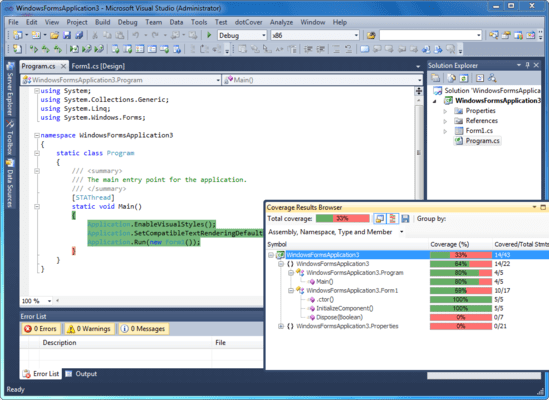
  • Improved presentation of class members - When you browse coverage results with dotCover 1.1.1, you can clearly see properties with getters and setters, as well as events with add and remove accessors. Anonymous delegates and lambdas are represented by nodes within containing methods denoting types that they receive and return.
  • HTML and JSON reports - In addition to XML export available previously, dotCover 1.1.1 allows you to generate reports as HTML and JSON both from the console runner and from Visual Studio coverage UI.
  • Integration with NDepend - dotCover 1.1.1 provides support for NDepend in the form of exporting coverage reports to XML for NDepend.
  • Predefined color schemes - Some like it dark, some like it bright, so why not provide several color highlighting schemes by default? That said, you can still fine-tune coverage highlighting colors by tweaking dotCover display items via Tools | Options | Environment | Fonts and Colors.
  • Support for Dynamic NUnit Tests - Full support for dynamic NUnit Test cases as well as Combinatorial, Sequential and other common NUnit attributes.
  • Filtering coverage tree on-the-fly - You can now exclude a specific node, or all nodes except this node, from the coverage tree and have dotCover instantly recalculate percentages of covered and uncovered code.
  • Getting coverage analysis data from TeamCity - You can now use TeamCity Visual Studio plug-in to connect to a TeamCity server and obtain data from a Continuous Integration coverage analysis run.
  • Incremental update of coverage info when tests are partially rerun - Coverage information is calculated incrementally without requiring full profiling on new runs, making the whole process much faster.
  • Per-solution coverage settings - Starting from dotCover 1.1.1, coverage filters are stored per-solution in projectName.dotCover files. In case you're covering a compiled application, i.e. you're not working with a solution per se, global settings are used.